A demonstration of functionality and options in the project page module [this paragraph is the lead paragraph].
Project page structure [this is the main content area of this page]
A project page, at a minimum, consists of a front page (Home). The page you are viewing now is the front page. In addition you can have one or more subpages, which can optionally be included as menu points in the project page menu just below the picture above.
All project pages are based on the same template, which always has a standard UiT header with the UiT logo, a search button and a menu button on the top. On the bottom there is a standard UiT footer with a selection of useful links. In between these two standard sections are the project page specific sections of the main page, which are structured as follows:
Banner (mandatory)
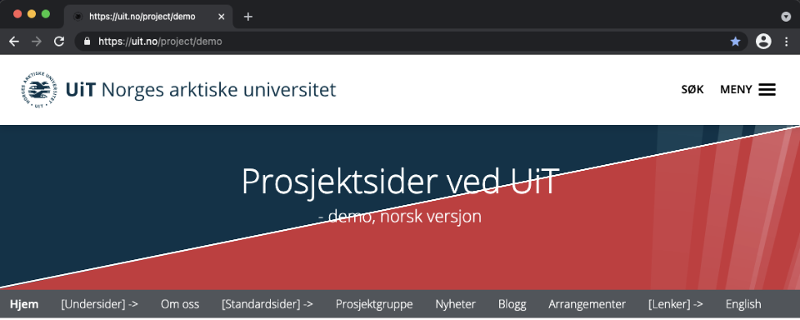
The banner can be an image (see example above) or a blue or red profile element (see illustration). The title and any subtitle of the project can be placed either across the banner or below it (just under the project page menu). If you use an image, rights to such usage must be cleared. If you do not already have a suitable image, you can use the digital image database Mostphotos, with which UiT has an agreement. You can request access to Mostphotos here (Feide log-in required). It is important that you do not create a user directly on mostphotos.com, as you will then not be connected to UiT's agreement and will thus have to pay to download photos.
Project page menu (mandatory)
The menu contains links to subpages, or links to other pages (other language versions, external web pages, etc.). The menu items can be organized in any order, except for Home which has a fixed location. A subpage can either be a normal subpage that you manually fill with content, or it can be a default page that fills automatically with content you post elsewhere. There are four different optional default pages to choose from. Read more about the different types of subpages by clicking on [Subpages] and [Default pages] in the menu above. Read more about links to other pages / language versions by clicking on [Links] in the menu.
Description (mandatory, but can optionally be hidden from the front page)
A short description of the page, which is also used as metadata by search engines such as Google (description of the project page in search results). See the text line directly below the project page menu above.
Main content (optional, manual field)
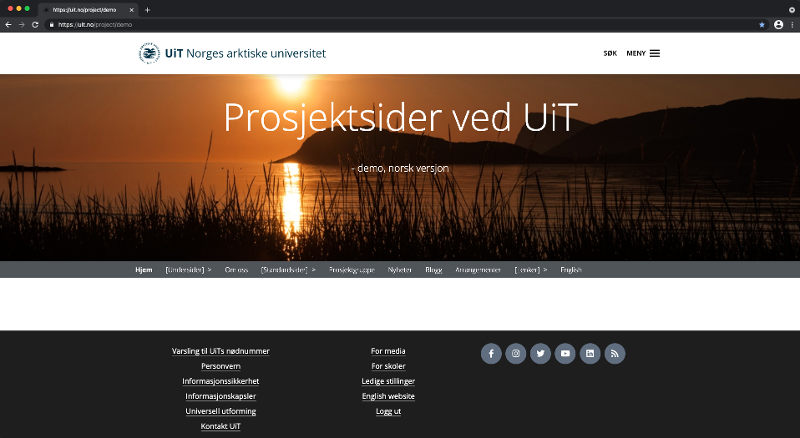
A field for free content on the front page, which can consist of text, images and video. It is optional if you want to use this field for project content to a significant degree, or if you want to put most or all of the content on subpages and just have a very simple front page (see illustration). This entire text about the structure of project pages that you are currently reading is placed in the field for main content, and thus forms the main part of the content on this front page.
Next events (optional, automatic section)
The next events from the optional default page Activities can be displayed on the front page. Events that are added to the page will also be automatically published on en.uit.no/tavla. See example below.
Latest news (optional, automatic section)
The latest news from the optional default News page can be displayed on the front page. See example below.
Latest blogpost (optional, automatic section)
The latest blog posts from the optional default Blog page can be displayed on the front page. See example below.
Project workers (optional, automatic section)
You can choose to automatically list members of the project on the front page, in addition to the optional Project group default page. See example below.
Text field at the bottom (optional, manual field)
At the very bottom, after the elements listed above, you can have a new field for free content (text, images and video). See example below.
Latest news
Next events:
Project group



Latest blogpost
[This is the bottom text field]
This is a separate free content field (text, pictures and video) placed at the bottom of the page.
[Loading...]