Default pages
In addition to normal subpages, there are four optional default pages.
You choose whether you want to activate some of the standard pages, which consist of Project group, News, Blog and Activities. These are pages that are not manually filled with content directly, as with normal subpages, but that automatically retrieve content from elsewhere. The list of project members and the latest content from each of the last three pages can also optionally be displayed on the project's front page.
Project group
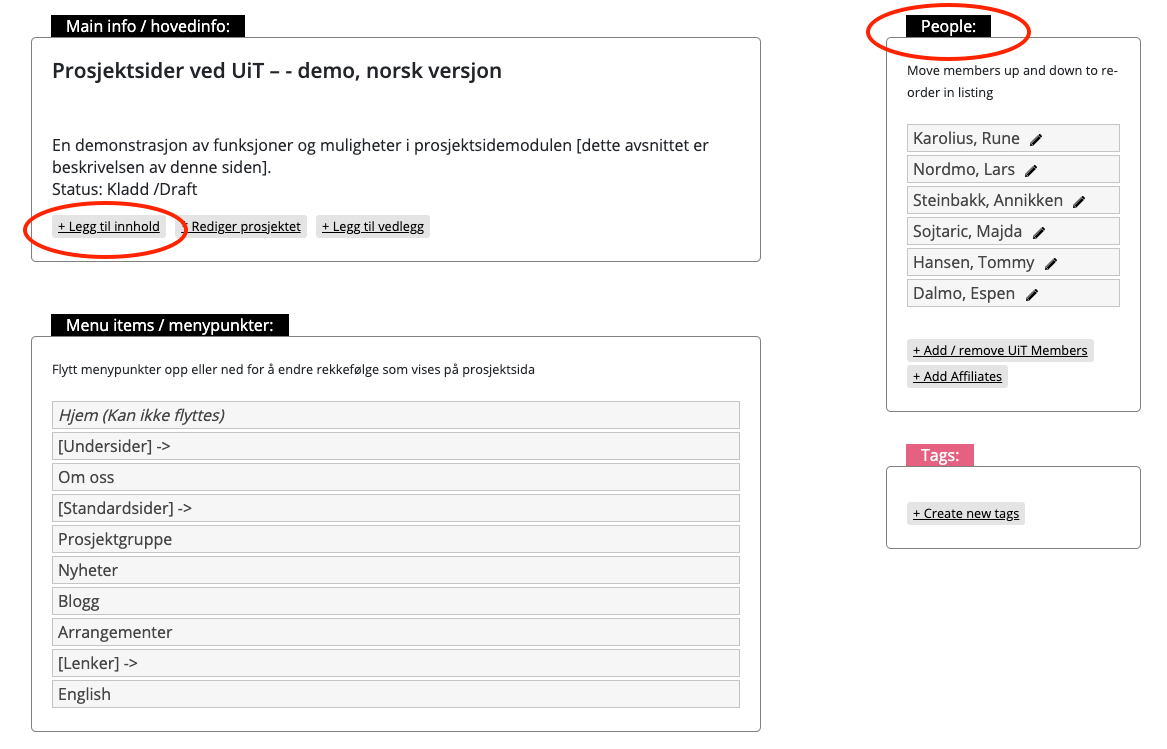
This page lists all registered members of the project. By clicking on a name, more information about the individual is presented. Members are registered under People in the project page's admin section, see illustration.
News
On the news page, you can post news items related to the project. A news item can consist of text, photos and video. News items are added via the + Legg til innhold (+ Add content) button in the project page's admin section, see illustration.
Blog
On the blog page you can post blog posts related to the project. A blog post can consist of text, images and video. Blog posts are added via the + Legg til innhold (+ Add content) button in the project page's admin section.
Activities
On the page for activities you can post events related to the project. Events registered on this page will also be automatically published on en.uit.no/tavla. Eventsare added via the + Legg til innhold (+ Add content) button in the project page's admin section. If you do not want events to be published on Tavla, you can alternatively create a normal subpage instead where you list upcoming events.